Showing posts with label Planning. Show all posts

Sunday, March 10, 2019

Working Supermom Secret... My Nightly Cleaning Routine

My house isn't always spotless, in reality whose is? However I do my best to keep it clean and tidy and I've found my new nightly routine is helping wonders. 

After my daughter is off in bed (8:30 PM) I begin my "Power Hour" rather than hitting the couch. This also helps me get in my steps each day, because working a desk job, doing college work and blogging, I spend a lot of time sitting on my butt.

With my routine I have found that I clean minimally on the weekends which means more time to enjoy my family. I only do what I can get done in 1 hour, and now that I've been doing this consistently it barely takes me 30 minutes to complete it all. 

M/W/F - 1st floor
T/R - 2nd floor
F - Basement
Every night - Dishes & vacuum hard floors.

My first floor consists of 5 rooms:

  1. Kitchen
  2. Living room
  3. Dining room
  4. Bonus room (and hallway)
  5. Half bathroom
My second floor has 7 rooms
  1. Master Bedroom
  2. Master Bathroom/Closet
  3. Adam's Office
  4. Gwen's Playroom
  5. Gwen's Bedroom
  6. Gwen's Bathroom
  7. Laundry room/closet
My basement has 5 rooms
  1. Living room
  2. My craft room/office
  3. Bathroom
  4. Bulk Storage
  5. Holiday Storage
M/W/F Plan - #1, 2 & 14 are done every night
  1. Load the dishwasher (should have been unloaded in your Morning Routine)
  2. Wash by hand anything that doesn't fit in the dishwasher and set aside to dry while you finish the rest of your routine
  3. Wipe down the stove, including the bottom of the inside if you baked anything tonight
  4. Wipe down all counters
  5. Wipe down the outside of the refrigerator and dishwasher
  6. Do a quick scan of the cabinets and wipe down any visible mess
  7. Go through the living room and pick up any dishes/clothes/things that don't belong
  8. If it goes upstairs drop it in the transportation basket on your stairs (if you don't have one you need one, check out my post on it here)
  9. Clean off & wipe down the dining room table putting everything back where it goes (this is quick for me because we don't eat in our dining room)
  10. Bonus room is just yard sale storage right now so I just ignore it
  11. Check the half bath for any needs (i.e. toilet paper) and do a quick wipe down of the toilet, sink and mirror. 
  12. Off to grab my Ryobi cordless vacuum, this thing is amazing and so much better than a Dyson or Shark (in my opinion) because we have all Ryobi cordless tools so there is always a battery fully charged waiting for me (we have 8 total batteries)
  13. Also grab the small spray bottle of rubbing alcohol and a microfiber cloth... you'll see why in a minute
  14. Vacuum the entire downstairs which is all hardwood floors. 
  15. I'll usually do a quick sweep of the couch as well for any crumbs
  16. Use the rubbing alcohol and microfiber cloth to clean any spots on the couch, just spray it on and scrub softly with the cloth and your couch is like new (test in a small inconspicuous spot before doing in an obvious location to ensure you have true microfiber)
  17. Using my wonderful O-Cedar Spin Mop I add super hot water and just a small cap full of Spic & Span and quickly mop my entire first floor. With the spin mop the mop becomes just barely damp so I don't have to worry about it ruining my hardwood floors. 
T/R Plan - this routine is done half while my daughter takes a bath and half after she's in bed, and during my Morning Routine I start laundry on a delay so it's ready to go in the dryer as soon as I get home from work so that it's ready to put away during my Power Hour.
  1. Quickly go around picking everything up off the floors that would be in the way of vacuuming, since I do this regularly there is very little to pick up. 
  2. Vacuum the entire upstairs (which is all carpet)
  3. Gwen is responsible for keeping her room & playroom clean but I still do a quick walk thru just to ensure that things are picked up and nothing is in there that she forgot about. After she is in bed I will continue on with step 4.
  4. Wipe down her tub, counters and toilet
  5. Use my Ryobi cordless vacuum on her floors (it's so quiet it can't be heard in her bedroom)
  6. In the master bathroom wipe down the tub, counters and toilet. I clean the inside of the shower every other time I shower with a handled scrub sponge filled with half vinegar and half blue dawn, keeps the soap scum at bay.
  7. Vacuum the master bath floors. 
  8. Quick pick-up in the master closet and put away any of my make-up or other items I've left out on my make-up table
  9. Put away any laundry that needs put away
F Plan
  1. Clean the living room, gathering dishes, folding blankets, fluffing pillows. 
  2. Check the mini-fridge to see what needs restocked or what has gone bad
  3. Check the snack drawer for what needs restocked
  4. Clean off my desk including scanning in all papers that need processed from the week
  5. Vacuum the living room & craft room floors
  6. Wipe down the bathroom sink & toilet
  7. Vacuum bathroom floors
  8. The shower only gets cleaned once a month, no one uses it, but cleaning it keeps the spiders out
  9. Vacuum the storage room
  10. Take inventory of what needs to be purchased on my next shopping trip
  11. Put back anything that wasn't properly put away throughout the week
  12. Vacuum the holiday storage room
  13. Some weeks I'll also prep for the next holiday decor change out by pulling out the proper totes and setting them aside. 
I hope this helps you get a quick simple nightly routine down to help keep your house as clean as can be. 

What is your favorite cleaning tip that has ever been shared with you or that you figured out on your own? 

Just remember, with planning and organization, you CAN do it all.

Saturday, February 23, 2019

Time to plan for… Dr. Seuss’ Birthday


Dr. Seuss' Birthday is March 2nd, but we did our projects a week early for two reasons, one so I could share with you all, and 2 because we have soccer open house next weekend and weren't sure if we'd have enough time. 

We love Dr. Seuss in our house, so much so we read probably 2-3 books a week. This year Gwen chose 3 books for our Dr Seuss celebration, Cat in the Hat, The Lorax & Fox in Sox. So, we are doing some fun Thing 1 & Thing 2 hand-prints, making Truffula Tree cupcakes and a Popsicle stick fox.

I also started making some treats I was going to send to school with Gwen to her class before I realized that March 2nd was a Saturday. In my prep for this year I had all the items cut and ready to go, I just needed to buy the packages of goldfish crackers. So in anticipation, I will share that here, for your preparation for next year.

Classroom present

For this you can use either small bags of Goldfish or small bags of Swedish fish depending on if you want to go sweet or savory. I printed 27 of these (in 3.5x5" and cut them out to staple to the bag of treats)


Fox in Sox Fox

3 popsicle sticks, orange marker, orange paper, googly eyes and a black puff ball. 

We used hot glue to glue everything together so that we could quickly play with them. 


*I had to print out a copy of the book title for the picture because she ran off to read the book (it's one of her favorites)

Thing 1 & Thing 2 paint handprints

This one is super easy, all you need is red, white and blue acrylic paint (or finger paint) a piece of paper and a black marker.


Voila! Gwen drew on my face and I drew on hers so that we were both helping each other out. She really enjoyed getting to paint my hands so I could do hand-prints too. 

Lorax Cupcakes

While we made our batter & icing from scratch, you can make this much easier by just grabbing a box mix and container of frosting.


Gwen added a couple little teddy grahams to hers because she said they looked like little Lorax men.


For the truffula trees there are 2 options, tulle & a straw or cotton candy & cookies, we went with cotton candy & Pirouinne cookies because it’s just too yummy.

Hope you enjoyed these super easy ideas and can incorporate some of them into your plans for next weekend. 

Just remember, with planning and organization, you CAN do it all.

Sunday, December 30, 2018

My 12 Google Calendars

I'm a digital girl, all the way. We have been a paper-free house for nearly 3 years, no binders, no planners, no notebooks, etc. Today, let's talk calendars and planning. We'll touch on meal planning and such but I'll get more in depth in a couple weeks. 

Google Calendars are AMAZING! I have 12 of them. I know that sounds like a lot, and like it's hard to manage, but in reality it couldn't be easier. All 12 calendars are shared with my husband (including my personal one) with Edit access so we easily know what is going on with each other when trying to plan things.  In order, they are:

  1. Heidi Pope - my personal calendar for my appointments (doctor, hair, paydays, time off etc.)
  2. Activities - this is for anything and everything I have found within a decent driving distance (usually 30 miles) that sounds remotely interesting. This calendar is shared with about 2 dozen people (read only) in my area to share ideas about what is going on.
  3. Adam Pope - a calendar for my husbands appointments, work time off & paydays, this is actually his google calendar, but shared with me with edit permissions so I can add/edit things on his calendar as well as see what he has going on. 
  4. Budget - every bill we have due is on the calendar, this allows for a quick glance on when things need paid (even if it's on auto-pay) 
  5. Contacts - this auto-fills from my Google Contacts which I use for all the information about my friends/family to keep me on top of things. I'll share more about what all goes into my Google Contacts in a later post. 
  6. xxx Elementary - this calendar is for everything related to my daughters school. Days off, half days, PTO meetings, fundraiser information, special days (hat day, sports day, etc.) etc. I keep this separate from her calendar because I share this one with a number of other parents in my daughters class/school. 
  7.  Gwen - this is my daughters calendar for her appointments and after school activities.
  8. Heidi School - I'm still a full time college student so I use this calendar to track projects due, mid-terms, finals, start/end of semester, submission dates for reimbursement from work, etc. 
  9. Holidays - ALL holidays, both major and fun holidays (i.e. Dr Seuss' birthday, National Watermelon Day, etc.)
  10. Household - filter changes, loofa changes, regular home maintenance, etc.
  11. Meal Planning - Here I keep our meal plan, the calendar event not only includes the name but the recipe as well. Each month I'll look at the previous and drag and drop the event if I want to reuse it, or I will create a new one for new recipes.
  12. Reminders - this is for reminders that are created through Google Keep (a lifeline for me)
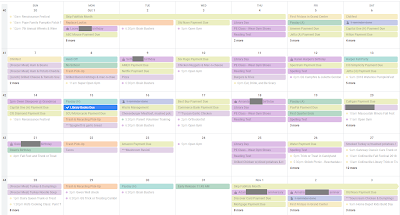
Having all the calendars open at the same time can be a lot to look at, but the great thing is you can turn them on and off for viewing. I usually keep meal planning, household, budget, and activities turned "off" for viewing because the reminders/notifications will still pop up, but I don't have to see them when I open my calendar unless I want to. This is my calendar with all 12 turned on:


With only the "major" calendars on (those needed for new appointment decision making), it is much cleaner and less overwhelming.


One of the best parts of this, aside from it being super organized and easy to see just what you need, is that you always have it on you. Whether your phone, tablet, computer, or any other device you can access your calendar to look and update immediately. 

Some tips:
  • When making an appointment (like a follow-up with the doctor) put it on the calendar immediately, don't even take a reminder card from them, just put it on the calendar so you can't forget to put it on there later and you're saving paper (double win). 
  • While 12 calendars work for me, you may need more, or less, use what works for you. 
  • If you have multiple children, you'll want a calendar for each of them, as well as a calendar per school if you have kids at different schools. 
  • If you have animals, give each their own calendar or make 1 calendar for animals and before each activity put their name, i.e. "OSCAR - vet appointment" "LUCY - heart worm medicine" for quick understanding.
  • Changing the color of the calendar also allows you to see at quick glance who has activities planned for which day. 
  • Make sure you share your calendars with people who need to know what is going on, it's so much cleaner and easier than "inviting" them to activities. 
  • To create your additional Google Calendars, go to Google Calendars on a PC and click the elipses next to "Add Calendar" and select "New Calendar" 


Hope this was helpful for you! Check back soon for information on Google Contacts, Google Keep, Meal Planning, OneNote and other ways to be a "Working Supermom". 

Just remember, with planning and organization, you CAN do it all.